Blueprint
From drawing to a checked BOM – matched to your stock in minutes.
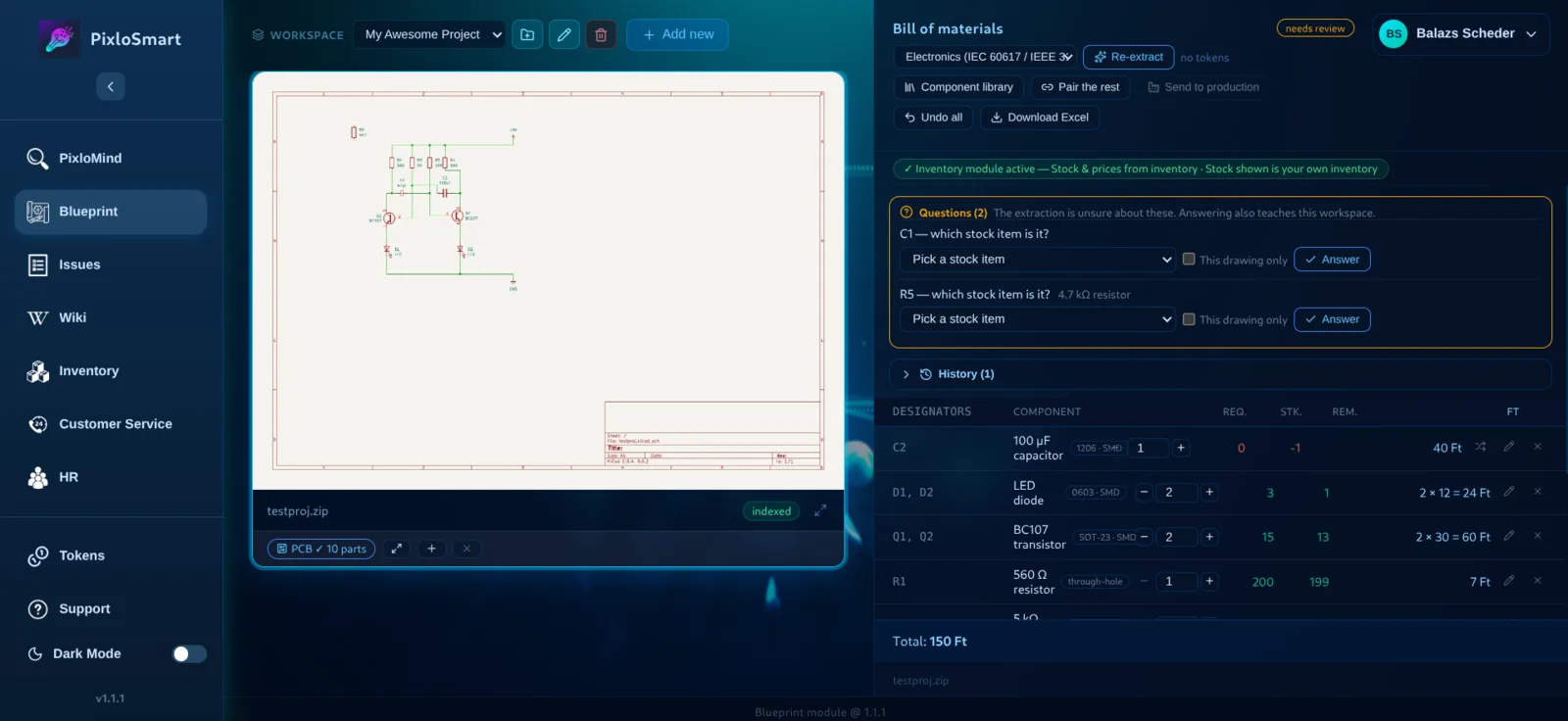
Your design tool’s BOM is just a list. It doesn’t know what is on your shelf or what your warehouse calls a part. Blueprint builds the bridge: drawing → bill of materials → what’s in stock → what’s missing or can substitute → stock deducted for production.
What you gain
Minutes, not hours
The bill of materials is extracted, grouped and priced automatically.
AI asks, it doesn’t guess
Deterministic rules run first; when unsure, Blueprint asks a question.
Learns your naming
Your answers become workspace rules and part aliases.
Often zero tokens
Native projects, CAD-export PDFs and pick-and-place files are often free to process.
Features
Works with any design tool
Cad projects natively; from Altium, Eagle, OrCAD or EasyEDA via a PDF schematic plus a pick-and-place CSV export.
Standard-aware extraction
Standard profiles, value notation and row grouping turn “R10 / 10k” into one clean 10 kΩ resistor line.
Review questions
Uncertain rows become questions. An unchecked list can’t go to production.
Stock pairing and substitutes
Rows are paired with your inventory; AI pairs the leftovers and suggests substitutes.
Send to production
Stock is deducted only when every row is paired and available – and a recall gives it back exactly. If a part drops too low, an ordering task is created automatically in Issues.
Decision log, undo and Excel export
Every decision is logged and can be undone; the BOM exports to Excel.
Pairs well with
Frequently asked questions
What if the AI makes a mistake?
Deterministic rules run first, and the AI asks instead of guessing. Every decision is logged and reversible, and an unchecked list can’t go to production.
Which design software do you support?
Any of them: a PDF schematic and a pick-and-place export are enough. The output of CAD software is supported natively as well.
Where are our drawings stored?
The software has been security-audited and can run on your own server, so drawings never leave the company.
See it on your own data – in 30 minutes.
Bring one of your drawings or documents and we’ll show you live what PixloSmart gets out of it. No commitment.
Book a demo ▸